Create an Access Point that provides a VPN (on a Raspberry PI)
MEMO: this is what I can piece together now. This is just for reference next time I look at the machine and try to figure out whats wrong.
This is done with Manjaro ARM on a Raspberry PI4. What's the reason for a setup ? There is a proliferation of devices that want and need to be in the internet actually for some good reasons, but giving away the proper location to the Red Army of China or the Singularity feels wrong.
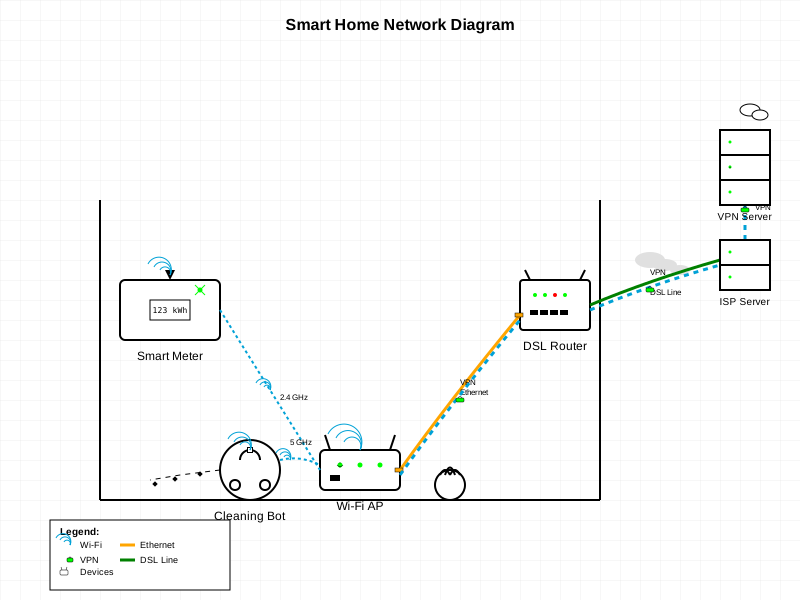
Setting up the Access Point #
Free wlan0 for our purposes. Edit /etc/NetworkManager/NetworkManager.conf:
[keyfile]
unmanaged-devices=interface-name:wlan0
Then we use hostapd.
Edit the file /etc/hostapd/hostapd.conf to have these values, where
driver=nl80211 is the Raspberry Pi 4 specific:
interface=wlan0
driver=nl80211
ssid=freewlan
hw_mode=g
channel=0
wpa=2
wpa_passphrase=12345678
wpa_key_mgmt=WPA-PSK
wpa_pairwise=TKIP
rsn_pairwise=CCMP
Tip #
If you want to make your life miserable place a ' ' after the
wpa_passphrasevalue.
What was that for ? Not sure if needed (ask an AI)
`/etc/systemd/network/hostapd.network`

```
[Match]
Name=wlan0

[Network]
Address=192.168.66.248/24
```
We also need dnsmasq:
Edit the file /etc/dnsmasq.conf to have these values. We are doing a
192.168.66.0/24 subnet here. Our AP will get the address .248. We
leave .1-.31 outside of the DHCP range for no good reason (its my customary
static range).
server=1.1.1.1
interface=wlan0
dhcp-range=192.168.66.32,192.168.66.127,12h
Now we need forwarding and firewalls rules.
We edit /etc/sysctl.d/99-sysctl.conf:
net.ipv4.ip_forward=1
net.ipv6.conf.wlan0.disable_ipv6 = 1
I disable ipv6. The reason being I want the bots to connect to ipv4 only, so we can do proper masquerading and NATing without ipv6 packets escaping.
We use iptables-save and iptables-restore to manage the initial
configuration (without VPN):
*nat
:PREROUTING ACCEPT
:INPUT ACCEPT
:OUTPUT ACCEPT
:POSTROUTING ACCEPT
-A POSTROUTING -s 192.168.66.0/24 -o end0 -j MASQUERADE
COMMIT
*filter
:INPUT ACCEPT
:FORWARD ACCEPT
:OUTPUT ACCEPT
-A INPUT -m state --state RELATED,ESTABLISHED -j ACCEPT
-A INPUT -i wlan0 -p icmp -j ACCEPT
-A INPUT -i wlan0 -p udp -m udp --dport 53 -j ACCEPT
-A INPUT -i wlan0 -p tcp -m tcp --dport 53 -j ACCEPT
-A INPUT -i wlan0 -p udp -m udp --sport 67:68 --dport 67:68 -j ACCEPT
-A INPUT -i wlan0 -j DROP
-A INPUT -s 192.168.66.248/32 -i wlan0 -j ACCEPT
-A INPUT -i wlan0 -m iprange --src-range 192.168.66.128-192.168.66.255 -j DROP
-A FORWARD -i wlan0 -o end0 -j ACCEPT
-A FORWARD -i end0 -o wlan0 -m state --state RELATED,ESTABLISHED -j ACCEPT
-A FORWARD -s 192.168.66.248/32 -i wlan0 -j ACCEPT
-A FORWARD -i wlan0 -m iprange --src-range 192.168.66.128-192.168.66.255 -j DROP
COMMIT
We basically do not want direct traffic to our access point server from the access point clients, and we do not want manually assigned addresses outside the .1-.127 range. Exceptions are ICMP, DNS and DHCP.
We gotta remove wlan0 from the grip of the network manager, so edit
/etc/NetworkManager/NetworkManager.conf:
# Configuration file for NetworkManager.
# See "man 5 NetworkManager.conf" for details.

[keyfile]
unmanaged-devices=interface-name:wlan0
This should be basically it.
Install stuff into systemd and test that clients can connect and access the internet, without a VPN. If that doesn't work, Fuhgeddaboudit!
Setting up the mullvad VPN #
Create a Wireguard configuration with https://mullvad.net/de/account/wireguard-config?platform=linux
You will get a mullevad.conf file,that will look something like this:
[Interface]
PrivateKey = mQz6p7F1kQZt5ZJ1u2JwJ8s2Vt7c8YgKJk2FhQ8rC1Y=
Address = 10.5.5.4/32, 2a03:1b20:1:f410::a01d/128
DNS = 10.64.0.1

[Peer]
PublicKey = ku1NYeOAGbY65YL/JKZhrqVzDJKXQiVj9USXbfkOBA0=
Endpoint = 185.254.75.3:51820
AllowedIPs = 0.0.0.0/0, ::/0
Ok, so what is important of course is the PrivateKey and the Address which
you shouldn't share in a blog over the internet. These are unique to your
account! If you mess these up you can't connect (PrivateKey) or will not
get proper reply packets (Address).
DO NOT USE wg-quick
Wireguard on its own is just responsible for setting up the mullvad VPN
device, we have to do the routing and the forwarding with iptables.
/etc/wireguard/mullvad-up.sh:
 1#!/usr/bin/env bash
 2
 3# Create the interface
 4ip link add mullvad type wireguard
 5
 6#
 7# No need to edit above
 8# ---------------------
 9#
10# Set the private key (replace echo value with your actual key from mullvad.conf)
11
12wg set mullvad private-key <(echo "mQz6p7F1kQZt5ZJ1u2JwJ8s2Vt7c8YgKJk2FhQ8rC1Y=")
13
14# Configure the peer (freplace peer and endpoint with values from mullvad.conf)
15wg set mullvad peer ku1NYeOAGbY65YL/JKZhrqVzDJKXQiVj9USXbfkOBA0= \
16    allowed-ips 0.0.0.0/0 \
17    endpoint 185.254.75.3:51820 \
18    persistent-keepalive 25
19
20# Assign IP addresses (from mullvad.conf)
21ip -4 address add 10.5.5.4/32 dev mullvad
22ip -6 address add 2a03:1b20:1:f410::a01d/128 dev mullvad
23
24#
25# ----------------------
26# No need to edit below
27
28# Set MTU and bring interface up
29ip link set mtu 1420 up dev mullvad
30
31# Create routing table (check if it exists first)
32grep -q "200 vpn" /etc/iproute2/rt_tables || echo "200 vpn" >> /etc/iproute2/rt_tables
33ip route add default dev mullvad table 200
34
35# Exclusions - these IPs will always use main table
36ip rule add from 192.168.66.248 table main priority 50
37ip rule add to 192.168.66.248 table main priority 51
38
39# Route wlan0 traffic through VPN
40ip rule add iif wlan0 table 200 priority 60
41
42# NAT setup - VPN traffic
43iptables -t nat -D POSTROUTING -s 192.168.66.0/25 -o end0 -j MASQUERADE 2>/dev/null || true
44iptables -t nat -A POSTROUTING -s 192.168.66.0/25 -o mullvad -j MASQUERADE
45iptables -I FORWARD -i wlan0 -o mullvad -j ACCEPT
46iptables -I FORWARD -i mullvad -o wlan0 -m state --state RELATED,ESTABLISHED -j ACCEPT
47
48# NAT setup - excluded traffic still goes through end0
49iptables -t nat -A POSTROUTING -s 192.168.66.0/25 -o end0 -j MASQUERADE
50
51echo "Mullvad VPN is up"
and
/etc/wireguard/mullvad-down.sh:
 1#!/usr/bin/env bash
 2
 3# Remove policy routing rules
 4ip rule del iif wlan0 table 200 priority 60 2>/dev/null || true
 5ip rule del from 192.168.66.248 table main priority 50 2>/dev/null || true
 6ip rule del to 192.168.66.248 table main priority 51 2>/dev/null || true
 7
 8# Remove VPN route
 9ip route del default dev mullvad table 200 2>/dev/null || true
10
11# Remove NAT and forward rules
12iptables -t nat -D POSTROUTING -s 192.168.66.0/25 -o mullvad -j MASQUERADE 2>/dev/null || true
13iptables -D FORWARD -i wlan0 -o mullvad -j ACCEPT 2>/dev/null || true
14iptables -D FORWARD -i mullvad -o wlan0 -m state --state RELATED,ESTABLISHED -j ACCEPT 2>/dev/null || true
15
16# Restore end0 NAT (ensure it exists)
17iptables -t nat -A POSTROUTING -s 192.168.66.0/25 -o end0 -j MASQUERADE 2>/dev/null || true
18
19# Remove the interface
20ip link delete dev mullvad 2>/dev/null || true
21
22echo "Mullvad VPN is down"
Let's hope I didn't forget anything. If it doesn't work feed this article to an AI and go from there.
Check that it works #
Run the up script which should not error.
 1$ wg show mullvad
 2interface: mullvad
 3  public key: xJH4vEkwhatQZdReverQ00X1dzhC50JRsc/ROic=
 4  private key: (hidden)
 5  listening port: 50994
 6
 7peer: 9ldhvN7r4xGZkGehbsNfYb5tpyTJ5KBb5B3TbxCwklw=
 8  endpoint: 146.70.117.34:51820
 9  allowed ips: 0.0.0.0/0
10  latest handshake: 8 seconds ago
11  transfer: 60.45 KiB received, 5.72 KiB sent
12  persistent keepalive: every 25 seconds
Ok the important bit is 60.45 KiB received. If you received 0 bytes,
either the opposite host is down (fairly unlikely) or you mistyped some
of the keys in fing vi (most likely).
Check systemd is running mullvad #
I forgot how I installed it but...
systemctl status mullvad
● mullvad.service - WireGuard Custom Up/Down Scripts
     Loaded: loaded (/etc/systemd/system/mullvad.service; enabled; preset: disabled)
     Active: active (exited) since Mon 2026-01-12 15:55:36 CET; 25min ago
    Process: 456 ExecStart=/etc/wireguard/mullvad-up.sh (code=exited, status=0/SUCCESS)
   Main PID: 456 (code=exited, status=0/SUCCESS)
        CPU: 110ms

Jan 12 15:55:36 gamboa systemd[1]: Starting WireGuard Custom Up/Down Scripts...
Jan 12 15:55:36 gamboa mullvad-up.sh[456]: Mullvad VPN is up
Jan 12 15:55:36 gamboa systemd[1]: Finished WireGuard Custom Up/Down Scripts.
/etc/systemd/system/mullevad.service
mullvad.service
[Unit]
Description=WireGuard Custom Up/Down Scripts
After=iptables.service
Before=hostapd.service
Requires=iptables.service

[Service]
Type=oneshot
RemainAfterExit=yes
ExecStart=/etc/wireguard/mullvad-up.sh
ExecStop=/etc/wireguard/mullvad-down.sh

[Install]
WantedBy=multi-user.target